


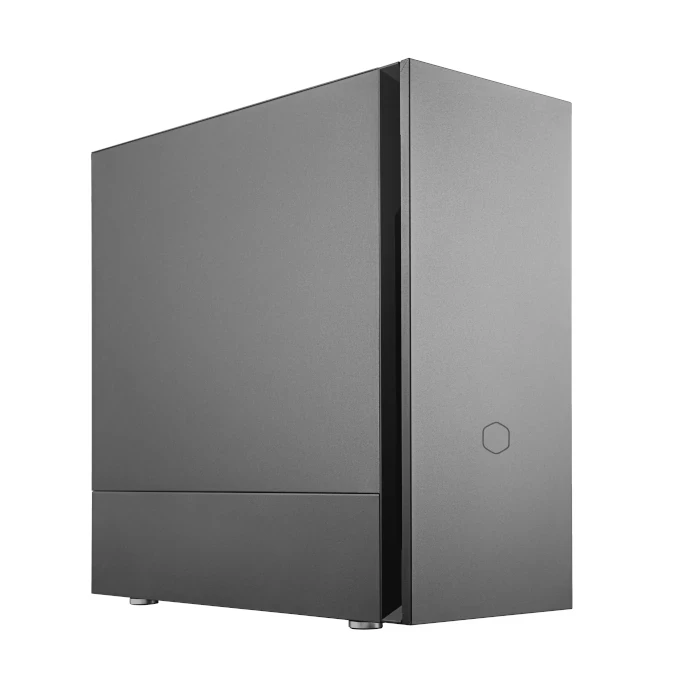
Run large language models, generative AI and machine learning workloads locally with a powerful desktop PC built around the GPU, VRAM and processing power your AI projects actually need.
If you're an independent developer, researcher, creator or small business building with AI, you don't necessarily need a £16,000+ workstation. These AI desktop PCs are designed to put serious local AI compute on your desk.
For local AI, GPU memory matters. Our systems are configured around the graphics processing power and VRAM required by modern LLMs and AI workloads.
Run compatible language models directly on your own hardware using platforms such as Ollama and LM Studio, without sending every request to a cloud API.
Develop and experiment with AI using CUDA, PyTorch, machine learning frameworks, generative AI tools and your own applications.
From entry-level local AI development to powerful GPU systems for larger models, choose a configuration that matches your workload, budget and ambitions.

Free UK Shipping
4 Years Warranty as Standard
| Processor: | Intel Core Ultra 5 250K 20 Core |
|---|---|
| Memory: | 32GB DDR5 6000MHz |
| Graphics: | 2x NVIDIA RTX 5060 Ti 16GB |
| Storage: | 1TB Samsung 990 Pro SSD |
| Operating System: | Windows 11 Home |
An AI desktop PC is a high-performance computer designed to run artificial intelligence applications locally. Unlike a conventional desktop PC, an AI-focused system is built around the components that matter most for AI workloads — particularly the GPU, VRAM, processor, system memory and storage.
For developers working with large language models (LLMs), generative AI, machine learning and AI-powered applications, running models locally can provide a powerful alternative to relying entirely on cloud-based AI services.
For a solo developer, the right AI desktop can provide your own private AI development environment — giving you the freedom to experiment, build, test and run models directly on your own hardware.
Local large language models are becoming increasingly practical as modern GPUs provide more memory and dramatically higher AI performance. A suitably configured desktop PC can be used to download, run and experiment with compatible LLMs directly on your own machine.
Local AI development can be useful when you want greater control over your data, predictable access to your hardware, lower reliance on cloud services or simply the ability to experiment with AI without paying for every API request.
Our AI desktop PCs can be configured for popular local AI platforms including Ollama and LM Studio, allowing developers to experiment with supported open-source and locally hosted language models.
For developers building AI applications, NVIDIA GPU systems can provide access to the CUDA ecosystem and popular frameworks such as PyTorch. This makes a suitably configured desktop PC a flexible platform for development, experimentation and prototyping.
Choosing an AI desktop PC is different from choosing a conventional gaming or office computer. The best configuration depends heavily on the models and applications you intend to run.
For many local AI workloads, GPU memory (VRAM) is one of the most important specifications to consider. Larger models can require significantly more memory, so choosing the right GPU can make the difference between a model running comfortably and not fitting into available VRAM.
System memory also matters, particularly when working with larger models, development environments, datasets and multiple applications simultaneously.
Although the GPU is often the star of an AI system, the CPU remains important for general development, data preparation, compilation, multitasking and workloads that are not GPU accelerated.
AI models can consume substantial amounts of storage. Fast NVMe SSD storage provides responsive loading and a practical environment for keeping models, datasets, development tools and projects available locally.
These systems sit between a conventional high-performance desktop and a dedicated enterprise AI workstation, giving individual developers access to serious AI computing without necessarily requiring a multi-GPU server-class system.
Common questions about AI desktop PCs, local LLMs and choosing the right hardware for AI development.
The best PC for running a local LLM depends on the model you want to run. GPU performance and VRAM are particularly important, as larger models can require considerably more GPU memory. A suitable AI desktop PC can provide the GPU, RAM and storage needed to run compatible LLMs locally.
The amount of VRAM you need depends on the model, quantisation, context length and workload. Smaller local LLMs can run on GPUs with relatively modest VRAM, while larger models may require significantly more. For local AI, choosing a GPU with sufficient VRAM can be more important than simply choosing the fastest GPU.
Yes. Many open-source and downloadable large language models can be run locally on a suitably configured desktop PC. Applications such as Ollama and LM Studio make it easier to download, configure and run compatible models directly on your own computer.
Yes. Ollama and LM Studio are popular platforms for running compatible AI models locally. The performance you achieve will depend on the model, quantisation, GPU, available VRAM and other system specifications.
It can be. For local LLM inference, the available VRAM can determine whether a model fits on the GPU at all. Once a model fits, GPU performance becomes increasingly important for inference speed. This is why an AI desktop with more VRAM can sometimes be more useful for local AI than a faster GPU with insufficient memory.
Yes. Compatible local AI software can distribute a model across multiple GPUs. A dual-GPU system can therefore provide access to more combined GPU memory than a single graphics card. For example, two 16GB GPUs provide 32GB of combined GPU memory. Multi-GPU performance depends on the software, model and hardware configuration, so two GPUs should not be assumed to provide twice the performance of one.
Yes. A suitably configured AI desktop can be used for local LLM development, machine learning, generative AI, CUDA development, PyTorch and other GPU-accelerated workloads. The ideal configuration depends on the software, models and datasets you intend to use.
AI desktop PCs are designed to provide powerful local AI computing for individual developers, enthusiasts and smaller businesses. Dedicated AI workstations are generally aimed at larger and more demanding professional workloads and can use significantly more expensive GPUs, larger memory configurations and multi-GPU setups.
If you're a developer who wants to run local LLMs, experiment with AI and build applications on your own machine, an AI desktop PC can provide a more accessible starting point.
Choose an AI desktop PC designed around the GPU, VRAM, memory and storage requirements of your AI workload.
Explore AI Desktop PCs